


Arizona State Fair
3.814.00 Reviews
App Specs
- Version
- 3.0.0
- Updated On
- License
- Free
- Downloads
- 10,000+
- Developer
- Arizona State Fair
- Categories
- Events
- Platform
- Android
Screenshots



 Analysis by AppCompare
When I’m planning a fair visit, the tricky part isn’t deciding whether I want to go; it’s turning a loose idea into a day that works for everyone. I want to know what’s happening, where to go, and whether a change of plan will send us wandering. Arizona State Fair is designed for that practical stretch between “let’s go” and arriving at the fair, with event information, maps, discounts, and games gathered in one place.
A fair-day plan, not a pocket substitute
It helps to set expectations: this is an events app for the Arizona State Fair, not a way to recreate the rides, food, or atmosphere at home. I’d open it while deciding what kind of visit I want, then use it to organize the day around the fair itself. That distinction matters. If you’re only looking for a general entertainment app, this is too specific; if you’re heading to the fair and want fewer decisions to make on the fly, the focus is a strength.
The app is free, and Arizona State Fair is the developer. It has a 3.7 average from around 33 ratings, with over 10,000 installs, so it has reached a modest but meaningful audience without being a universal planning tool. It is rated for Everyone, and version 3.0.0 requires Android 6.0 or later. Those details make it easier to judge whether it fits your device and whether you’re comfortable installing a fair-specific app for a visit.
Start with the people and the pace
Before I browse, I’d settle two things: who is coming and how much structure they enjoy. A family with children may want a few fixed stops and room for breaks, while friends might prefer to choose a show and leave the rest of the day open. The schedule and map are most useful when they answer an actual question—what should we catch, and how do we get there?—rather than becoming a reason to plan every minute.
For a realistic example, imagine meeting relatives after work and arriving with only a couple of hours to spare. I’d check the event schedule first, pick one attraction or performance that suits the group, and use the map to orient everyone before we split up for food or browsing. If someone is running late, a shared plan based on a recognizable location is more useful than a long string of directions sent in a chat.
Move from schedule to map without overplanning
My preferred workflow is to look for a small number of worthwhile stops, note their times, and then check how they fit together geographically. That last step is easy to overlook: a schedule can look manageable on a screen while the actual walk between places takes time, especially with a group. The map can help you think in clusters—one nearby activity after another—instead of zigzagging across the grounds.
I would also leave space around any must-see event. A fair visit rarely goes exactly to plan: someone wants a snack, the group pauses, or an interesting booth catches the eye. Treat the schedule as a guide rather than a contract. If the app’s information is useful before you arrive, you can spend less time making decisions while standing in a crowded area and more time enjoying what is in front of you.
Worth Reading Before You Choose

EA SPORTS FC Mobile 26 Is a Bigger Football Game, but It Takes Time

Flipboard Shows What News Apps Must Do Beyond the Feed

Switching to Android Auto Means Rethinking Your Driving Routine

Google Calendar Makes a Crowded Week Easier to Manage

Ludo King Makes the Most of the Minutes Between Plans

Baby Panda World Brings Quick Play to Modern Phones, but Its Game Library Feels Busy
The app’s stated minimum Android requirement is version 6.0, while the broader fair-day usefulness depends more on how current and readable the information is when you need it. I’d check the plan before setting out rather than relying on a phone screen for every decision once the grounds are busy. That is a small habit, but it keeps the app in its best role: preparation and orientation, not a replacement for paying attention to the people and signs around you.
Hand the plan to your group
A fair app is only as helpful as the way a group uses it. One person can check the schedule and suggest a meeting point, then pass the key details to everyone else in a text or say them aloud before the group separates. That simple handoff matters because not every companion will want to install another app, and nobody should have to keep one person’s phone in hand just to know where to meet.
Discounts and games add a lighter reason to open the app, but I’d treat them as extras rather than the foundation of the visit. A deal is useful when it fits something you already planned to do; it is less useful if chasing it sends the group out of its way. Likewise, a game may be a pleasant pause, but it does not replace the schedule or map when timing and location are the real questions.
What it does well—and where I’d be cautious
Compared with searching the web, checking social posts, and passing screenshots around, a dedicated fair app has the advantage of putting several kinds of visit information under one roof. Compared with a general map app, it is more relevant to fair-specific planning; compared with simply wandering, it offers a way to make a short visit feel intentional. The trade-off is that it serves one event, so its usefulness naturally falls away when you are not planning around the Arizona State Fair.
I would not assume every screen will answer every practical question at the moment I need it. A map can help with orientation, but it cannot decide which route feels comfortable for your group, and a schedule still needs a little judgment when plans change. If you strongly prefer not to install event-specific apps, or you are happy to explore without checking times, you can skip it and use whatever planning method already works for you.
A useful companion when the fair is the destination
My overall view is that this is worth considering when you want a more organized fair day without turning the outing into a rigid itinerary. Start with one or two priorities, use the map to make the route sensible, and tell your group where to regroup before people split up. That approach makes the app more useful than simply opening it at random while walking.
For visitors who like a little advance planning, especially families or groups coordinating different interests, the mix of fair-focused information can save avoidable backtracking and uncertainty. For someone who only wants a general calendar, a permanent city guide, or a no-phone day, it is not the right fit. I’d use it as a practical helper, keep plans flexible, and let the fair—not the screen—set the pace.
Ever found yourself craving a taste of a classic state fair experience without leaving the comfort of your sofa? Well, that's where the Arizona State Fair app comes into play. I recently took it for a spin and let me tell you, it’s like having a mini-fairground in your pocket. Let’s dive into the details and see what this app has to offer.
Getting Started with Arizona State Fair
First things first, downloading the Arizona State Fair app is a breeze. A quick search on the App Store or Google Play, and you're ready to go. When you launch the app, you’re greeted with a vibrant interface that immediately captures the fun and excitement of the fair. It’s got this colorful, inviting vibe that just makes you want to tap around.
Features Galore
So, what’s inside? The app is bursting with features that make planning a visit to the actual fair a lot easier. You’ve got event schedules, maps, and even a list of all the delicious food stalls. I mean, who doesn’t love fair food? It’s like they’ve packed all the excitement of the fair into this tiny app.
One nifty feature is the interactive map. You can easily navigate through different sections of the fair, and it even shows you where all your favorite rides and attractions are. It’s super handy, especially if you’re like me and get lost easily in large crowds. Plus, it updates in real-time, so you’re always in the loop.
Stay in the Know
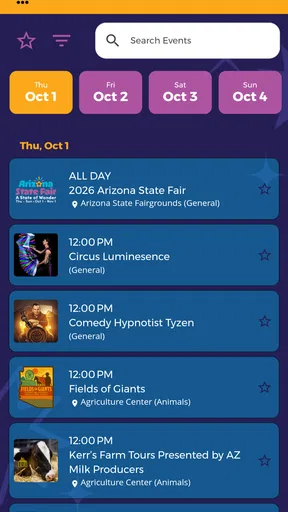
The events calendar is another highlight. The fair is chock-full of cool shows and performances, and the app ensures you don’t miss out on any action. From concerts to livestock shows, everything is listed with details on timing and location. You can even set reminders so you won’t miss your favorite events.
And let’s not forget about the notifications. The app keeps you updated with the latest happenings, special deals, and any unexpected weather changes. It’s like having a personal guide who’s got your back, making sure your fair experience is top-notch.
Tickets and More
Buying tickets? Easy peasy. The app lets you purchase tickets directly, which is a huge time saver. No more standing in long queues; just a few taps, and you’re all set. Plus, you can check out different ticket packages and find one that suits your needs.
The app also features a FAQ section, which is super helpful for first-timers. It covers everything from parking info to safety guidelines, ensuring you’re well-prepared for your visit.
The User Experience
As for the user experience, the app runs smoothly without any hiccups. The design is intuitive, making navigation a breeze. Whether you’re tech-savvy or not, you’ll find it easy to get around the app. Plus, it’s compatible with both Android and iOS, so everyone’s covered.
One thing I particularly appreciated was the app’s performance. It loads quickly, and I didn’t encounter any annoying lag or crashes. It’s clear the developers put a lot of thought into making this app as user-friendly as possible.
Final Thoughts
All in all, the Arizona State Fair app is a fantastic companion for anyone looking to maximize their fair experience. It’s packed with useful features, easy to navigate, and genuinely enhances your visit. Whether you’re planning a day out with family or just want to stay updated on the latest happenings, this app has got you covered.
If you’re heading to the fair this year, I highly recommend giving this app a try. It’s like having a little slice of the fair right in your pocket. So, what are you waiting for? Grab your phone and get ready to dive into the fun!
Pros
- User-friendly interface and navigation.
- Comprehensive event schedule included.
- Real-time updates on fair activities.
- Interactive map for easy navigation.
- Exciting AR features enhance experience.
Cons
- Requires constant internet connection.
- Limited offline functionalities.
- Notifications can be overwhelming.
- Some features may drain battery.
- Occasional lag in loading pages.
FAQs for Arizona State Fair
What is the Arizona State Fair app used for?
The Arizona State Fair app is a convenient tool for visitors to enhance their fair experience. It provides real-time updates on events, schedules, and attractions. Users can access maps, purchase tickets, and receive notifications about special offers and promotions. It’s designed to make your visit smoother and more enjoyable.
Is the Arizona State Fair app free to download?
Yes, the Arizona State Fair app is free to download on both Android and iOS devices. While the app itself is free, users may incur costs for in-app purchases such as tickets or merchandise. Be sure to check for any additional charges that may apply during your visit.
Does the app require an internet connection to function?
While the Arizona State Fair app offers some offline functionalities, such as maps and schedules, a stable internet connection is recommended for the best experience. Features like real-time updates, ticket purchases, and notifications require connectivity to function properly and keep you informed throughout your visit.
Can I purchase tickets through the app?
Yes, the Arizona State Fair app allows users to purchase tickets directly. This feature provides a hassle-free way to buy entry tickets, ride passes, and event tickets without waiting in line. Ensure you have a secure internet connection and a valid payment method for seamless transactions.
Is the Arizona State Fair app user-friendly for all ages?
The app is designed with a user-friendly interface suitable for all ages. It features easy navigation, clear icons, and straightforward instructions. However, younger users may benefit from adult assistance, especially when making purchases or navigating more complex sections of the app.


